
Business automation
Business process automation solutions that remove manual work
We build automation into the systems you run every day, so approvals, updates and reports happen without anyone chasing them.
What’s included
- Approvals and workflows
- System integrations
- Automated reporting
- Alerts and reminders
Why automate
Where manual work creeps in
Our business process automation solutions take repeatable work out of your team’s day. Orders, approvals, stock updates, invoices and reminders follow the same steps every time, so software should handle them.
When people do those steps by hand, or copy data between disconnected systems, tasks get delayed, skipped or typed in twice. We map how work flows today, find where time and accuracy are lost, and automate the parts that follow clear rules.
Where a process needs a proper system rather than a quick fix, our custom software development team builds it, with automation designed in from the start.
Processes worth automating
- Approvals waiting in someone’s inbox
- Data copied between systems
- Reports rebuilt by hand every week
- Stock and order status updates
- Reminders nobody remembers to send
Our business process automation solutions
We automate inside the tools you already use, or build the system that makes automation possible.
Workflows and approvals
Requests, sign-offs and task routing across finance, HR and operations, with a clear record of who did what.
Integrations and data sync
Connect your store, CRM, accounting and ERP so orders, customers and stock stay in step without copy and paste.
Automated reporting
Profit, sales and customer reports generated from live data, instead of spreadsheets rebuilt by hand.
Alerts and notifications
Email and in-app alerts for low stock, overdue tasks, new reviews or anything else that needs attention.
ERP rules and triggers
Custom triggers, validations and reminders built into your ERP, so the system follows how your business works.
AI-assisted steps
Summaries, classification and first drafts added to a workflow where a language model genuinely saves time.
AI and automationHow we automate a process
We start small, prove the value, then extend automation across the business.
- 1Map the process
We walk through the work step by step and find where time is lost.
- 2Pick the right wins
We prioritise rules-based tasks that save the most time for the least risk.
- 3Build and connect
Automation is built, connected to your systems and tested with real data.
- 4Monitor and extend
We watch it run, handle edge cases and move on to the next process.
Automation in systems we’ve built
Automation works best when it is part of the system, not bolted on afterwards.
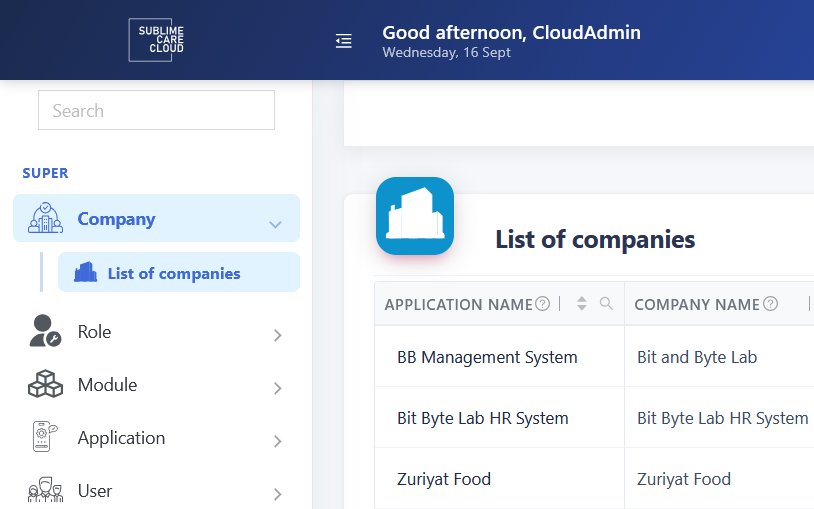
30+business modules across four industries
- Education
- Accounting
- HR & payroll
- Health & nutrition
Flagship product · Modular ERP
Sublime Care Cloud
Separate tools for sales, stock, accounts and HR, plus paying for unused modules.
A metadata-driven, multi-tenant ERP. Each company switches on only the modules it needs.
OutcomeOne platform for schools, finance teams, HR and payroll, and health and nutrition apps, with a Flutter app on the same API.
- .NET 8
- SQL Server
- Angular 18
- Flutter
- Self-hosted AI

E-commerce reporting
Zuriyat Foods
A food brand needing clear numbers on profit and customers.
Custom profit, cost-of-goods, city-wise and repeat-customer reports in WooCommerce.
OutcomeKey business numbers come straight from store data, not manual spreadsheets.
- WooCommerce
- WordPress
- PHP
- MySQL
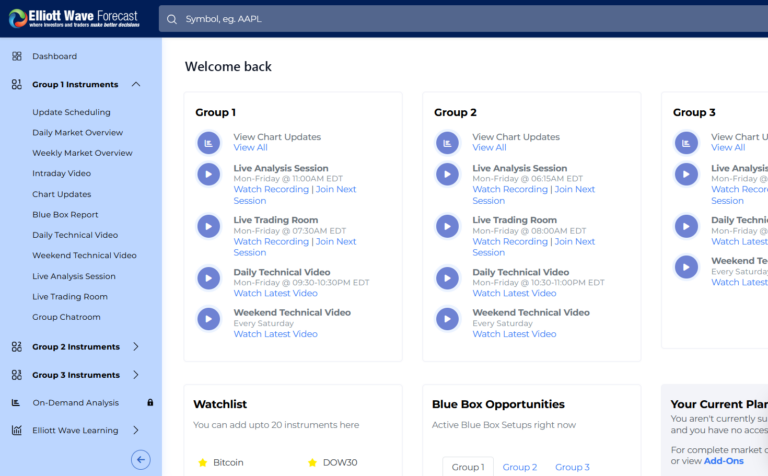
Client · Subscription automation
Elliott Wave Forecast
A subscription business where renewals, marketing tools and support all depend on the same member data.
Daily automated renewals and expiries, queued syncing to marketing and affiliate tools, and support emails turned into tickets.
OutcomeRenewals, list updates and support tickets run without anyone triggering them.
- Laravel
- Queues
- Scheduled jobs
- Integrations
Built to last
Automation you can see, trust and change
Automation should never be a black box. We document the rules we build and log what runs, so the people responsible for a process can see what happened and why.
We work with .NET and ASP.NET Core, PHP and Laravel, WordPress and WooCommerce, with SQL Server and MySQL databases. Because we host and maintain what we build, automations keep running as your systems change.
What you get
- A clear map of your process
- Documented, logged automation rules
- Role-based access and approvals
- Hosting, monitoring and ongoing support
Business process automation FAQs
What people usually ask before automating a process.
How much do business process automation solutions cost?
It depends on how many steps, systems and rules are involved. Automating one approval flow is a small job; connecting several systems is larger. After mapping the process we give you a clear estimate and suggest starting with the automation that saves the most time.
Which business processes should we automate first?
Start with tasks that are frequent, rule-based and error-prone: data entry between systems, approvals, stock updates, invoicing and recurring reports. These give the quickest return. Processes that depend on judgement are usually better supported with timely alerts and good information than fully automated.
Can you automate our existing software, or do we need a new system?
Often we can work with what you have, through APIs, integrations and scheduled jobs. If your current tools can’t expose the data or rules you need, we’ll explain why and suggest the smallest change that makes automation possible, which may be a custom module.
How long does an automation project take?
A single workflow or integration can often be delivered in weeks. Broader automation across several departments is phased over months. We deliver in stages, so the first automated process is already working and saving time while we plan the next one.
What happens if an automated process fails?
We build automations with logging and alerts, so failures are visible rather than silent. When something goes wrong, the right person is notified and the task can be retried or handled manually. We also monitor and maintain the automations we host for you.
Which process is costing your team the most time?
Walk us through it. We’ll show you what can be automated and where to start.